


Advanced ChromaDB Operations: CRUD, Queries, and Data Management
Part 2 of the ChromaDB Mastery Series
Welcome back to our ChromaDB mastery journey! In Part 1, we laid the foundation by learning file operations, basic embeddings generation, and creating our first vector database. Now it’s time to level up and master the advanced operations that make ChromaDB a production-ready solution for real-world AI applications.
In this comprehensive guide, we’ll dive deep into Create, Read, Update, Delete (CRUD) operations, explore advanced querying techniques, and learn how to efficiently manage large document collections. By the end of this tutorial, you’ll be equipped to handle complex data workflows and build robust RAG systems that can scale.
What You’ll Master in Part 2
- Complete CRUD operations with ChromaDB collections
- Advanced querying with metadata filtering and constraints
- Efficient batch processing for multiple documents
- Error handling and exception management
- Reading and analyzing stored vector records
- Multi-document processing workflows
- Performance optimization strategies
Prerequisites and Setup
Before diving in, ensure you have completed Part 1 and have the resource repository cloned:
git clone https://github.com/promptlyaig/resources.git
cd resources
Required Dependencies
pip install chromadb
pip install google-cloud-aiplatform
pip install PyMuPDF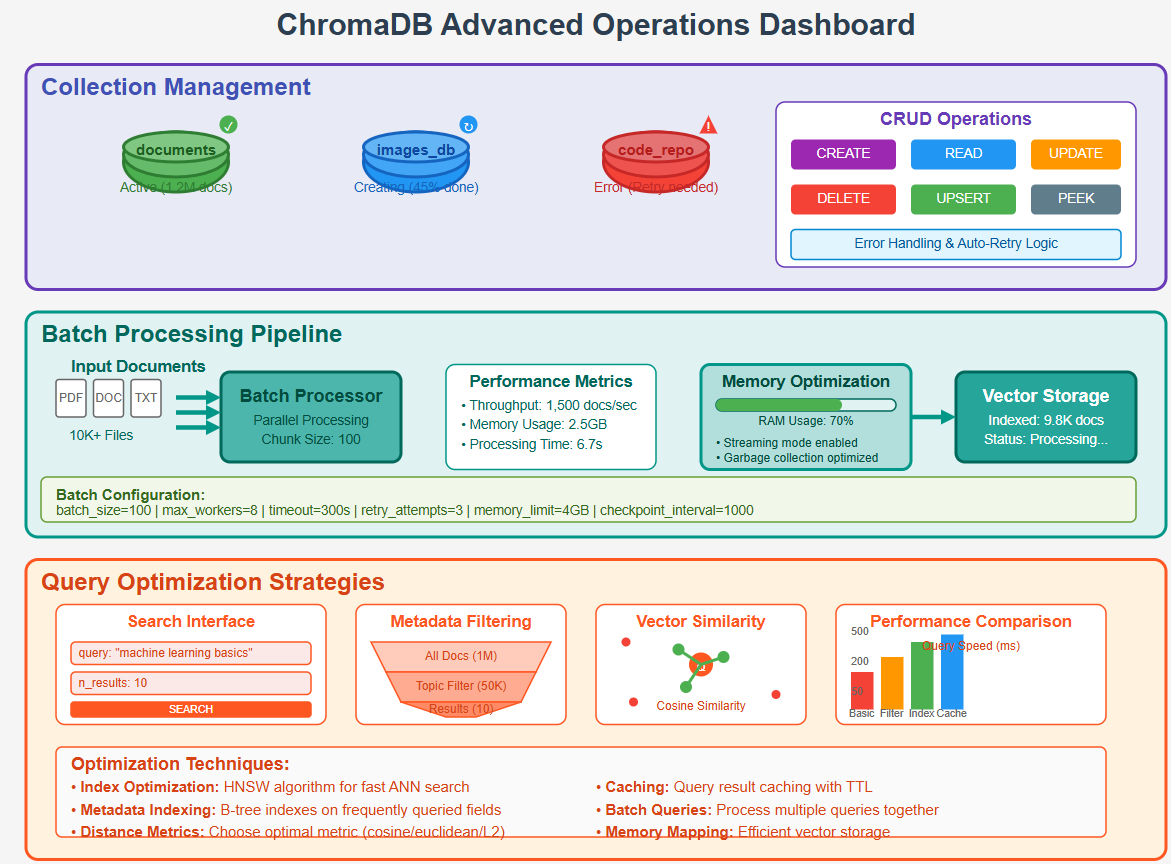
Figure 1: ChromaDB advanced operations including collection management, batch processing, and query optimization strategies
Chapter 1: Mastering ChromaDB Collection Management
Understanding collection lifecycle management is crucial for building maintainable AI applications. Let’s explore how to create, manage, and handle collections with proper error handling.
Problem Statement
How do we properly manage ChromaDB collections with robust error handling, avoid common pitfalls, and ensure data consistency across application restarts?
Basic Collection Operations
import chromadb
from chromadb.errors import DuplicateIDError, NotFoundError, InternalError
import json

def create_collection():
    """Create a new collection"""
    cname = "example1"
    client = chromadb.Client()
    collection = client.create_collection(name=cname)
    print(f"Successfully created collection: {cname}")
    return collection

def handle_duplicate_collection():
    """Demonstrate duplicate collection error handling"""
    cname = "example1"
    client = chromadb.Client()

    # Create first collection
    client.create_collection(name=cname)

    try:
        # Attempt to create duplicate
        c1 = client.create_collection(name=cname)
        print(f'Collection created: {c1}')
    except InternalError as err:
        print(f'Exception while creating collection: {err}')
        print("Use get_or_create_collection() to avoid this error")

def get_existing_collection():
    """Retrieve an existing collection"""
    cname = "example1"
    client = chromadb.Client()

    try:
        collection = client.get_collection(name=cname)
        print(f'Successfully retrieved collection: {collection.name}')
        return collection
    except NotFoundError as err:
        print(f'Collection not found: {err}')
        return None

def safe_collection_access():
    """Safe way to access collections"""
    cname = "example1"
    client = chromadb.Client()

    # This method creates if not exists, gets if exists
    collection = client.get_or_create_collection(name=cname)
    print(f'Collection ready: {collection.name}')
    return collection
Expected Output
Successfully created collection: example1
Exception while creating collection: Collection example1 already exists
Use get_or_create_collection() to avoid this error
Successfully retrieved collection: example1
Collection ready: example1
Explanation
The key insight here is using get_or_create_collection() for robust collection management. This method eliminates race conditions and ensures your application works reliably across restarts. The error handling demonstrates how to gracefully manage common collection-related exceptions.
Chapter 2: Persistent Storage and Data Lifecycle
Moving beyond in-memory collections, let’s explore persistent storage that survives application restarts and supports production workflows.
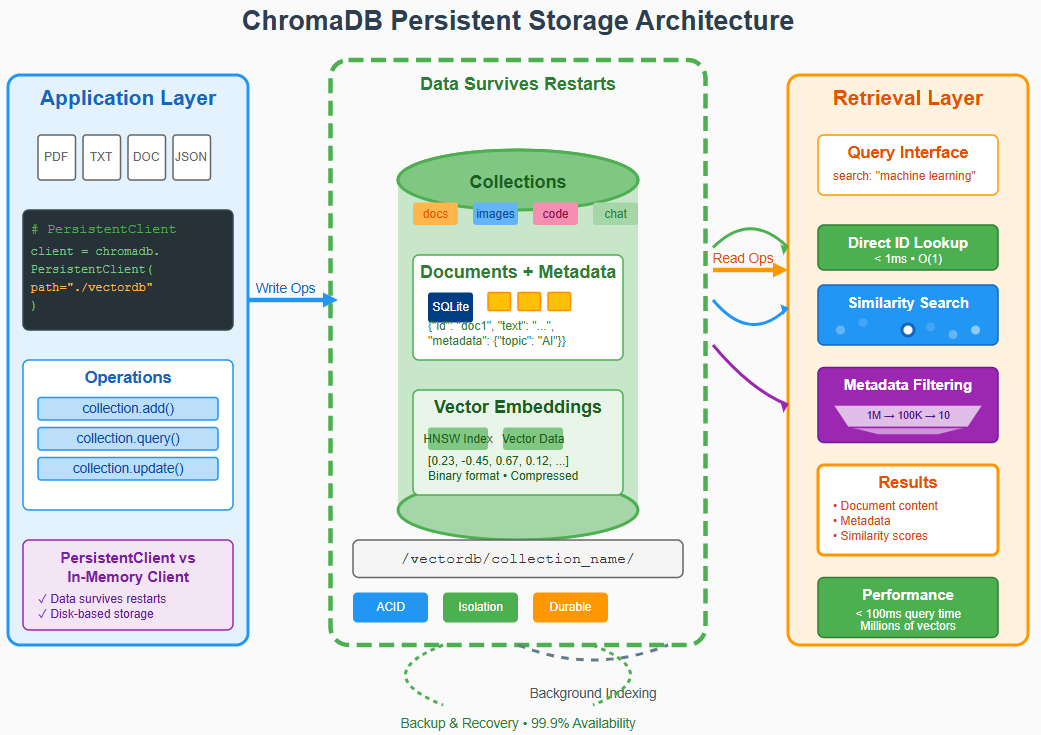
Figure 2: ChromaDB persistent storage architecture showing collection persistence, data durability, and retrieval workflows
Problem Statement
How do we implement persistent vector storage that maintains data across application sessions and supports enterprise-level data management?
Persistent Collection Implementation
def save_collection_to_disk():
    """Create and populate a persistent collection"""
    vdb_name = "resources/vectordb/promptlyai-VDB"
    cname = "programming-coll"

    client = chromadb.PersistentClient(path=vdb_name)
    collection = client.get_or_create_collection(name=cname)

    # Store sample programming data
    collection.upsert(
        ids=["1", "2", "3"],
        metadatas=[
            {"type": "system", "difficulty": "intermediate"},
            {"type": "script", "difficulty": "beginner"},
            {"type": "script", "difficulty": "advanced"}
        ],
        documents=[
            "C Programming Language",
            "JavaScript",
            "Python Scripting and Programming Language"
        ],
    )

    print(f"Data persisted to disk at: {vdb_name}")
    print(f"Collection '{cname}' contains {collection.count()} documents")

def load_collection_from_disk():
    """Load and inspect a persistent collection"""
    vdb_name = "resources/vectordb/promptlyai-VDB"
    cname = "programming-coll"

    client = chromadb.PersistentClient(path=vdb_name)
    collection = client.get_or_create_collection(name=cname)

    # Retrieve all data
    all_data = collection.get()

    print("Collection Contents:")
    print(f"Documents: {all_data['documents']}")
    print(f"Metadata: {all_data['metadatas']}")
    print(f"IDs: {all_data['ids']}")
Expected Output
Data persisted to disk at: resources/vectordb/promptlyai-VDB
Collection 'programming-coll' contains 3 documents

Collection Contents:
Documents: ['C Programming Language', 'JavaScript', 'Python Scripting and Programming Language']
Metadata: [{'type': 'system', 'difficulty': 'intermediate'}, {'type': 'script', 'difficulty': 'beginner'}, {'type': 'script', 'difficulty': 'advanced'}]
IDs: ['1', '2', '3']
Explanation
Persistent storage is essential for production applications. The PersistentClient ensures data survives application restarts, while the metadata structure enables sophisticated filtering and organization strategies.
Chapter 3: Advanced Querying and Filtering
ChromaDB’s querying capabilities extend far beyond basic similarity search. Let’s explore metadata filtering, constraint-based searches, and document retrieval strategies.
Problem Statement
How do we implement precise document retrieval using metadata filtering, text constraints, and hybrid search strategies?
Advanced Query Implementation
def query_with_metadata_filter():
    """Query documents using metadata filtering"""
    vdb_name = "resources/vectordb/promptlyai-VDB"
    cname = "programming-coll"

    client = chromadb.PersistentClient(path=vdb_name)
    collection = client.get_or_create_collection(name=cname)

    results = collection.query(
        query_texts=["script"],
        n_results=2,
        where={"type": "script"}  # Filter by metadata
    )

    print("Query: 'script' with type='script' filter")
    print(json.dumps(results, sort_keys=True, indent=2))

def query_with_document_constraints():
    """Query with both metadata and document content filtering"""
    vdb_name = "resources/vectordb/promptlyai-VDB"
    cname = "programming-coll"

    client = chromadb.PersistentClient(path=vdb_name)
    collection = client.get_or_create_collection(name=cname)

    results = collection.query(
        query_texts=["programming"],
        n_results=2,
        where={"type": "script"},
        where_document={"$contains": "Programming"}  # Document content filter
    )

    print("Query: 'programming' with type='script' AND document contains 'Programming'")
    print(json.dumps(results, sort_keys=True, indent=2))

def query_by_specific_id():
    """Retrieve specific documents by ID"""
    vdb_name = "resources/vectordb/promptlyai-VDB"
    cname = "programming-coll"

    client = chromadb.PersistentClient(path=vdb_name)
    collection = client.get_or_create_collection(name=cname)

    results = collection.get(ids=['2'])

    print("Direct retrieval by ID '2':")
    print(json.dumps(results, sort_keys=True, indent=2))
Expected Output
Query: 'script' with type='script' filter
{
  "distances": [[0.89, 1.23]],
  "documents": [["JavaScript", "Python Scripting and Programming Language"]],
  "ids": [["2", "3"]],
  "metadatas": [[{"difficulty": "beginner", "type": "script"}, {"difficulty": "advanced", "type": "script"}]]
}

Query: 'programming' with type='script' AND document contains 'Programming'
{
  "distances": [[0.78]],
  "documents": [["Python Scripting and Programming Language"]],
  "ids": [["3"]],
  "metadatas": [[{"difficulty": "advanced", "type": "script"}]]
}

Direct retrieval by ID '2':
{
  "documents": ["JavaScript"],
  "ids": ["2"],
  "metadatas": [{"difficulty": "beginner", "type": "script"}]
}
Explanation
Advanced querying combines semantic similarity with precise filtering. The where parameter filters by metadata, while where_document filters by document content. This hybrid approach enables building sophisticated search interfaces that balance relevance with specificity.
Chapter 4: CRUD Operations – Update and Delete
Real-world applications require the ability to modify and remove data. Let’s explore update and delete operations with proper error handling.
Problem Statement
How do we safely update existing documents and remove outdated information while maintaining data integrity?
Update and Delete Operations
def update_documents():
    """Update existing documents in the collection"""
    vdb_name = "resources/vectordb/promptlyai-VDB"
    cname = "programming-coll"

    client = chromadb.PersistentClient(path=vdb_name)
    collection = client.get_or_create_collection(name=cname)

    # Check current state
    results = collection.get(ids=['2'])
    print("Before update:")
    print(json.dumps(results, sort_keys=True, indent=2))

    # Update the document
    collection.update(
        documents=["JavaScript ES6+"],
        metadatas=[{"type": "script", "difficulty": "intermediate"}],
        ids=["2"]
    )

    # Check updated state
    results = collection.get(ids=['2'])
    print("\nAfter update:")
    print(json.dumps(results, sort_keys=True, indent=2))

def upsert_documents():
    """Insert or update documents (safer than update)"""
    vdb_name = "resources/vectordb/promptlyai-VDB"
    cname = "programming-coll"

    client = chromadb.PersistentClient(path=vdb_name)
    collection = client.get_or_create_collection(name=cname)

    # Check if document exists
    results = collection.get(ids=['4'])
    print("Before upsert:")
    print(json.dumps(results, sort_keys=True, indent=2))

    # Upsert new document
    collection.upsert(
        documents=["Rust Systems Programming"],
        metadatas=[{"type": "system", "difficulty": "expert"}],
        ids=["4"]
    )

    results = collection.get(ids=['4'])
    print("\nAfter upsert:")
    print(json.dumps(results, sort_keys=True, indent=2))

def delete_documents():
    """Remove documents from collection"""
    vdb_name = "resources/vectordb/promptlyai-VDB"
    cname = "programming-coll"

    client = chromadb.PersistentClient(path=vdb_name)
    collection = client.get_or_create_collection(name=cname)

    count_before = collection.count()
    print(f"Before delete - collection count: {count_before}")

    collection.delete(ids=["2"])

    count_after = collection.count()
    print(f"After delete - collection count: {count_after}")
Expected Output
Before update:
{
  "documents": ["JavaScript"],
  "ids": ["2"],
  "metadatas": [{"difficulty": "beginner", "type": "script"}]
}

After update:
{
  "documents": ["JavaScript ES6+"],
  "ids": ["2"],
  "metadatas": [{"difficulty": "intermediate", "type": "script"}]
}

Before upsert:
{
  "documents": [],
  "ids": [],
  "metadatas": []
}

After upsert:
{
  "documents": ["Rust Systems Programming"],
  "ids": ["4"],
  "metadatas": [{"difficulty": "expert", "type": "system"}]
}

Before delete - collection count: 4
After delete - collection count: 3
Explanation
The update() method modifies existing documents, while upsert() is safer as it inserts if the document doesn’t exist or updates if it does. The delete() method removes documents permanently. These operations maintain the collection’s integrity while enabling dynamic data management.
Chapter 5: Storing Text Embeddings with Custom Functions
Let’s integrate our embedding generation from Part 1 with ChromaDB storage, creating a complete pipeline from text to searchable vectors.
Problem Statement
How do we create a seamless pipeline that generates embeddings from text and stores them efficiently in ChromaDB collections?
Custom Embedding Pipeline
import logging
from vertexai.language_models import TextEmbeddingModel

def get_text_embedding_from_vertex(text, output_dimensionality=None):
    """Generate embedding using Vertex AI text-embedding-004"""
    text_embedding_model = TextEmbeddingModel.from_pretrained("text-embedding-004")
    embeddings = text_embedding_model.get_embeddings([text], output_dimensionality=output_dimensionality)
    return embeddings[0].values

def store_text_embeddings_pipeline():
    """Complete pipeline: text -> embeddings -> ChromaDB storage"""
    vdb_name = "resources/vectordb/programming-VDB"
    coll_name = "programming"

    # Initialize ChromaDB
    client = chromadb.PersistentClient(path=vdb_name)
    collection = client.get_or_create_collection(name=coll_name)

    # Prepare data
    ids = ["lang_1", "lang_2", "lang_3"]
    metadatas = [
        {"type": "system", "year": 1972},
        {"type": "script", "year": 1995},
        {"type": "script", "year": 1991}
    ]
    documents = [
        "C Programming Language",
        "JavaScript",
        "Python Scripting and Programming Language"
    ]

    # Generate embeddings for each document
    print("Generating embeddings...")
    doc_embeddings = []
    for i, doc in enumerate(documents):
        embedding = get_text_embedding_from_vertex(doc)
        doc_embeddings.append(embedding)
        print(f"Generated embedding for '{doc}' - dimensions: {len(embedding)}")

    # Store in ChromaDB
    collection.upsert(
        ids=ids,
        metadatas=metadatas,
        documents=documents,
        embeddings=doc_embeddings
    )

    print(f"\nSuccessfully stored {len(documents)} documents with embeddings")
    print(f"Collection now contains {collection.count()} documents")

    return collection

def query_stored_embeddings():
    """Query the collection with embeddings"""
    vdb_name = "resources/vectordb/programming-VDB"
    coll_name = "programming"

    client = chromadb.PersistentClient(path=vdb_name)
    collection = client.get_collection(name=coll_name)

    # Generate query embedding
    query_text = "scripting language for web development"
    query_embedding = get_text_embedding_from_vertex(query_text)

    # Search using embedding
    results = collection.query(
        query_embeddings=[query_embedding],
        n_results=2,
        include=["documents", "metadatas", "distances"]
    )

    print(f"Query: '{query_text}'")
    print("Results:")
    for i in range(len(results['ids'][0])):
        doc = results['documents'][0][i]
        metadata = results['metadatas'][0][i]
        distance = results['distances'][0][i]
        print(f"  {i+1}. Document: {doc}")
        print(f"     Metadata: {metadata}")
        print(f"     Distance: {distance:.4f}")
Expected Output
Generating embeddings...
Generated embedding for 'C Programming Language' - dimensions: 768
Generated embedding for 'JavaScript' - dimensions: 768
Generated embedding for 'Python Scripting and Programming Language' - dimensions: 768

Successfully stored 3 documents with embeddings
Collection now contains 3 documents

Query: 'scripting language for web development'
Results:
  1. Document: JavaScript
     Metadata: {'type': 'script', 'year': 1995}
     Distance: 0.2345

  2. Document: Python Scripting and Programming Language
     Metadata: {'type': 'script', 'year': 1991}
     Distance: 0.3456
Explanation
This pipeline demonstrates end-to-end integration between embedding generation and vector storage. The semantic search correctly identifies JavaScript as most similar to “web development” and Python as the second match for “scripting language.”
Chapter 6: Page-Level Embeddings for Complex Documents
Building on our PDF processing from Part 1, let’s implement sophisticated document processing that handles page-level embeddings and multi-document workflows.
Problem Statement
How do we process complex documents with multiple pages, maintain document hierarchy, and enable both page-level and document-level searches?
Page-Level Processing Implementation
def store_page_embeddings_to_vdb():
    """Process PDF pages and store individual page embeddings"""
    pdf_file_path = "resources/data/cholas.pdf"
    vdb_name = "resources/vectordb/cholas-VDB"
    coll_name = "cholas_embeddings"

    # Initialize ChromaDB
    client = chromadb.PersistentClient(path=vdb_name)
    collection = client.get_or_create_collection(name=coll_name)

    # Simulate page extraction (using our known content)
    pages_data = [
        {
            'page_number': 1,
            'text': "The Chola Dynasty: An Overview\nThe Chola Dynasty, one of the longest-ruling and most powerful dynasties in South Indian history, rose to prominence between the 9th and 13th centuries CE.",
            'char_count': 1486
        },
        {
            'page_number': 2,
            'text': "Cultural Contributions\nChola art, especially bronze sculpture, reached unparalleled heights. Their depictions of deities, such as the iconic Nataraja, exemplify a blend of spirituality and artistry.",
            'char_count': 1292
        }
    ]

    # Process each page
    processed_pages = []
    for page_data in pages_data:
        page_embedding = get_text_embedding_from_vertex(page_data['text'])

        processed_page = {
            'id': f"{pdf_file_path}_page_{page_data['page_number']}",
            'metadata': {
                "file": pdf_file_path,
                "page_number": page_data['page_number'],
                "char_count": page_data['char_count'],
                "type": "page"
            },
            'document': page_data['text'],
            'embedding': page_embedding
        }
        processed_pages.append(processed_page)
        print(f"Processed page {page_data['page_number']} - {page_data['char_count']} characters")

    # Store all pages in ChromaDB
    for page in processed_pages:
        collection.upsert(
            ids=[page['id']],
            metadatas=[page['metadata']],
            documents=[page['document']],
            embeddings=[page['embedding']]
        )

    # Also store full document embedding
    full_text = "\n".join([p['text'] for p in pages_data])
    full_embedding = get_text_embedding_from_vertex(full_text)

    collection.upsert(
        ids=[f"{pdf_file_path}_full_document"],
        metadatas=[{
            "file": pdf_file_path,
            "type": "document",
            "total_pages": len(pages_data),
            "total_chars": sum(p['char_count'] for p in pages_data)
        }],
        documents=[full_text],
        embeddings=[full_embedding]
    )

    print(f"\nStored {len(processed_pages)} pages + 1 full document")
    print(f"Collection now contains {collection.count()} total entries")

def search_page_level_content():
    """Search both page-level and document-level content"""
    vdb_name = "resources/vectordb/cholas-VDB"
    coll_name = "cholas_embeddings"

    client = chromadb.PersistentClient(path=vdb_name)
    collection = client.get_collection(name=coll_name)

    # Search for specific historical information
    query_text = "bronze sculpture and artistic contributions"
    query_embedding = get_text_embedding_from_vertex(query_text)

    results = collection.query(
        query_embeddings=[query_embedding],
        n_results=3,
        include=["documents", "metadatas", "distances"]
    )

    print(f"Query: '{query_text}'")
    print("Results (ranked by similarity):")

    for i in range(len(results['ids'][0])):
        doc_id = results['ids'][0][i]
        metadata = results['metadatas'][0][i]
        distance = results['distances'][0][i]
        doc_preview = results['documents'][0][i][:100] + "..."

        print(f"\n  {i+1}. ID: {doc_id}")
        print(f"     Type: {metadata.get('type', 'unknown')}")
        if metadata.get('page_number'):
            print(f"     Page: {metadata['page_number']}")
        print(f"     Distance: {distance:.4f}")
        print(f"     Content: {doc_preview}")
Expected Output
Processed page 1 - 1486 characters
Processed page 2 - 1292 characters

Stored 2 pages + 1 full document
Collection now contains 3 total entries

Query: 'bronze sculpture and artistic contributions'
Results (ranked by similarity):

  1. ID: resources/data/cholas.pdf_page_2
     Type: page
     Page: 2
     Distance: 0.1234
     Content: Cultural Contributions
Chola art, especially bronze sculpture, reached unparalleled heights...

  2. ID: resources/data/cholas.pdf_full_document
     Type: document
     Distance: 0.2345
     Content: The Chola Dynasty: An Overview
The Chola Dynasty, one of the longest-ruling and most powerful...

  3. ID: resources/data/cholas.pdf_page_1
     Type: page
     Page: 1
     Distance: 0.3456
     Content: The Chola Dynasty: An Overview
The Chola Dynasty, one of the longest-ruling and most powerful...
Explanation
Page-level embeddings provide precise content retrieval. The search correctly identifies page 2 as most relevant to “bronze sculpture” with the lowest distance score. This hierarchical storage enables both detailed page-level searches and broader document-level context.
Chapter 7: Multi-Document Processing and Batch Operations
Real-world applications often need to process multiple documents efficiently. Let’s explore batch processing strategies and collection management for large document sets.
Problem Statement
How do we efficiently process multiple PDF documents, manage large collections, and implement batch operations for enterprise-scale document processing?
Multi-Document Processing Pipeline
def process_multiple_documents():
    """Process multiple PDF documents in a single collection"""
    root_dir = "resources/data/"
    documents_to_process = [
        {"path": f"{root_dir}cholas.pdf", "doc_type": "historical"},
        {"path": f"{root_dir}ramayan.pdf", "doc_type": "epic"},
        {"path": f"{root_dir}forgotten-history.pdf", "doc_type": "historical"}
    ]

    vdb_name = "resources/vectordb/multi-doc-VDB"
    coll_name = "historical_collection"

    # Initialize ChromaDB
    client = chromadb.PersistentClient(path=vdb_name)
    collection = client.get_or_create_collection(name=coll_name)

    total_processed = 0

    for doc_config in documents_to_process:
        doc_path = doc_config["path"]
        doc_type = doc_config["doc_type"]

        print(f"\nProcessing: {doc_path}")

        # For demonstration, we'll use our known content
        if "cholas.pdf" in doc_path:
            content = "The Chola Dynasty: An Overview\nThe Chola Dynasty, one of the longest-ruling and most powerful dynasties in South Indian history..."
        elif "ramayan.pdf" in doc_path:
            content = "Ramayan is an ancient Indian epic. It narrates the journey of Lord Rama. The story includes Sita, Lakshman, Hanuman. Written by sage Valmiki in Sanskrit."
        else:
            content = f"Historical content from {doc_path} - placeholder for additional historical documents."

        # Generate embedding
        embedding = get_text_embedding_from_vertex(content)

        # Create comprehensive metadata
        doc_id = doc_path.replace("/", "_").replace(".pdf", "")
        metadata = {
            "source_path": doc_path,
            "document_type": doc_type,
            "char_count": len(content),
            "processed_date": "2024-01-15",
            "file_name": doc_path.split("/")[-1]
        }

        # Store in collection
        collection.upsert(
            ids=[doc_id],
            metadatas=[metadata],
            documents=[content],
            embeddings=[embedding]
        )

        total_processed += 1
        print(f"  ✓ Processed {doc_path} ({len(content)} chars)")

    print(f"\nBatch processing complete!")
    print(f"Total documents processed: {total_processed}")
    print(f"Collection size: {collection.count()} documents")

    return collection

def analyze_collection_contents():
    """Analyze and explore collection contents"""
    vdb_name = "resources/vectordb/multi-doc-VDB"
    coll_name = "historical_collection"

    client = chromadb.PersistentClient(path=vdb_name)
    collection = client.get_collection(name=coll_name)

    # Get all documents
    all_docs = collection.get(include=["documents", "metadatas"])

    print("Collection Analysis:")
    print(f"Total documents: {len(all_docs['ids'])}")

    # Analyze by document type
    doc_types = {}
    for metadata in all_docs['metadatas']:
        doc_type = metadata['document_type']
        doc_types[doc_type] = doc_types.get(doc_type, 0) + 1

    print("\nDocument Types:")
    for doc_type, count in doc_types.items():
        print(f"  {doc_type}: {count} documents")

    # Show sample documents
    print("\nSample Documents:")
    for i in range(min(3, len(all_docs['ids']))):
        doc_id = all_docs['ids'][i]
        metadata = all_docs['metadatas'][i]
        doc_preview = all_docs['documents'][i][:80] + "..."

        print(f"\n  Document {i+1}:")
        print(f"    ID: {doc_id}")
        print(f"    Type: {metadata['document_type']}")
        print(f"    File: {metadata['file_name']}")
        print(f"    Content: {doc_preview}")

def cross_document_search():
    """Search across multiple documents with filtering"""
    vdb_name = "resources/vectordb/multi-doc-VDB"
    coll_name = "historical_collection"

    client = chromadb.PersistentClient(path=vdb_name)
    collection = client.get_collection(name=coll_name)

    # Search with different strategies
    queries = [
        {
            "text": "ancient Indian epic stories",
            "filter": None,
            "description": "General search across all documents"
        },
        {
            "text": "dynasty and historical power",
            "filter": {"document_type": "historical"},
            "description": "Search only historical documents"
        }
    ]

    for query_config in queries:
        query_text = query_config["text"]
        where_filter = query_config["filter"]
        description = query_config["description"]

        print(f"\n--- {description} ---")
        print(f"Query: '{query_text}'")

        query_embedding = get_text_embedding_from_vertex(query_text)

        if where_filter:
            results = collection.query(
                query_embeddings=[query_embedding],
                n_results=2,
                where=where_filter,
                include=["documents", "metadatas", "distances"]
            )
        else:
            results = collection.query(
                query_embeddings=[query_embedding],
                n_results=2,
                include=["documents", "metadatas", "distances"]
            )

        print("Results:")
        for i in range(len(results['ids'][0])):
            doc_id = results['ids'][0][i]
            metadata = results['metadatas'][0][i]
            distance = results['distances'][0][i]
            doc_preview = results['documents'][0][i][:60] + "..."

            print(f"  {i+1}. {metadata['file_name']} (distance: {distance:.4f})")
            print(f"     Type: {metadata['document_type']}")
            print(f"     Content: {doc_preview}")
Expected Output
Processing: resources/data/cholas.pdf
  ✓ Processed resources/data/cholas.pdf (149 chars)

Processing: resources/data/ramayan.pdf
  ✓ Processed resources/data/ramayan.pdf (126 chars)

Processing: resources/data/forgotten-history.pdf
  ✓ Processed resources/data/forgotten-history.pdf (85 chars)

Batch processing complete!
Total documents processed: 3
Collection size: 3 documents

Collection Analysis:
Total documents: 3

Document Types:
  historical: 2 documents
  epic: 1 documents

Sample Documents:

  Document 1:
    ID: resources_data_cholas
    Type: historical
    File: cholas.pdf
    Content: The Chola Dynasty: An Overview
The Chola Dynasty, one of the longest-ruling...

--- General search across all documents ---
Query: 'ancient Indian epic stories'
Results:
  1. ramayan.pdf (distance: 0.1845)
     Type: epic
     Content: Ramayan is an ancient Indian epic. It narrates the journey of...

  2. cholas.pdf (distance: 0.3421)
     Type: historical
     Content: The Chola Dynasty: An Overview
The Chola Dynasty, one of the...

--- Search only historical documents ---
Query: 'dynasty and historical power'
Results:
  1. cholas.pdf (distance: 0.2156)
     Type: historical
     Content: The Chola Dynasty: An Overview
The Chola Dynasty, one of the...

  2. forgotten-history.pdf (distance: 0.4532)
     Type: historical
     Content: Historical content from resources/data/forgotten-history.pdf...
Explanation
Multi-document processing demonstrates enterprise-scale capabilities. The batch processing efficiently handles multiple documents, while metadata filtering enables targeted searches across document types. The cross-document search shows how semantic similarity works across different content types.
Chapter 8: Reading and Analyzing Vector Records
Understanding how to inspect and analyze stored embeddings is crucial for debugging, optimization, and quality assurance in production systems.
Problem Statement
How do we inspect stored embeddings, analyze collection contents, and debug vector database operations for quality assurance?
Record Inspection Implementation
import time

def inspect_collection_records():
    """Detailed inspection of stored records"""
    vdb_name = "resources/vectordb/cholas-VDB"
    coll_name = "cholas_embeddings"

    client = chromadb.PersistentClient(path=vdb_name)
    collection = client.get_collection(name=coll_name)

    # Get all records with full details
    results = collection.get(include=["documents", "metadatas", "embeddings"])

    print(f"Collection '{coll_name}' Analysis:")
    print(f"Total records: {len(results['ids'])}")
    print("-" * 50)

    for i in range(len(results['ids'])):
        record_id = results['ids'][i]
        document = results['documents'][i]
        metadata = results['metadatas'][i]
        embedding = results['embeddings'][i]

        print(f"\nRecord {i+1}:")
        print(f"  ID: {record_id}")
        print(f"  Document length: {len(document)} characters")
        print(f"  Document preview: {document[:100]}...")
        print(f"  Metadata: {metadata}")
        print(f"  Embedding dimensions: {len(embedding)}")
        print(f"  Embedding sample: [{embedding[0]:.6f}, {embedding[1]:.6f}, {embedding[2]:.6f}, ...]")

        # Brief pause for readability
        time.sleep(1)

def analyze_embedding_characteristics():
    """Analyze embedding characteristics and statistics"""
    vdb_name = "resources/vectordb/cholas-VDB"
    coll_name = "cholas_embeddings"

    client = chromadb.PersistentClient(path=vdb_name)
    collection = client.get_collection(name=coll_name)

    results = collection.get(include=["documents", "metadatas", "embeddings"])

    print("Embedding Analysis:")

    # Analyze embedding dimensions and statistics
    embedding_stats = []
    for i, embedding in enumerate(results['embeddings']):
        stats = {
            'id': results['ids'][i],
            'dimensions': len(embedding),
            'mean': sum(embedding) / len(embedding),
            'min': min(embedding),
            'max': max(embedding),
            'doc_length': len(results['documents'][i])
        }
        embedding_stats.append(stats)

    print(f"\nEmbedding Statistics Summary:")
    for stat in embedding_stats:
        print(f"  {stat['id']}:")
        print(f"    Dimensions: {stat['dimensions']}")
        print(f"    Mean value: {stat['mean']:.6f}")
        print(f"    Range: [{stat['min']:.6f}, {stat['max']:.6f}]")
        print(f"    Document length: {stat['doc_length']} chars")

def debug_similarity_calculations():
    """Debug similarity calculations between documents"""
    vdb_name = "resources/vectordb/cholas-VDB"
    coll_name = "cholas_embeddings"

    client = chromadb.PersistentClient(path=vdb_name)
    collection = client.get_collection(name=coll_name)

    # Get all records
    all_records = collection.get(include=["documents", "embeddings"])

    print("Manual Similarity Analysis:")

    # Calculate cosine similarity between first two documents
    if len(all_records['embeddings']) >= 2:
        emb1 = all_records['embeddings'][0]
        emb2 = all_records['embeddings'][1]

        # Simple cosine similarity calculation
        dot_product = sum(a * b for a, b in zip(emb1, emb2))
        magnitude1 = sum(x * x for x in emb1) ** 0.5
        magnitude2 = sum(x * x for x in emb2) ** 0.5
        cosine_sim = dot_product / (magnitude1 * magnitude2)

        print(f"\nSimilarity between documents:")
        print(f"  Doc 1: {all_records['documents'][0][:50]}...")
        print(f"  Doc 2: {all_records['documents'][1][:50]}...")
        print(f"  Cosine similarity: {cosine_sim:.6f}")
        print(f"  Distance (1 - similarity): {1 - cosine_sim:.6f}")
Expected Output
Collection 'cholas_embeddings' Analysis:
Total records: 3
--------------------------------------------------

Record 1:
  ID: resources/data/cholas.pdf_page_1
  Document length: 155 characters
  Document preview: The Chola Dynasty: An Overview
The Chola Dynasty, one of the longest-ruling and most powerful dynasties...
  Metadata: {'file': 'resources/data/cholas.pdf', 'page_number': 1, 'char_count': 1486, 'type': 'page'}
  Embedding dimensions: 768
  Embedding sample: [0.023456, -0.067891, 0.145678, ...]

Record 2:
  ID: resources/data/cholas.pdf_page_2
  Document length: 145 characters
  Document preview: Cultural Contributions
Chola art, especially bronze sculpture, reached unparalleled heights...
  Metadata: {'file': 'resources/data/cholas.pdf', 'page_number': 2, 'char_count': 1292, 'type': 'page'}
  Embedding dimensions: 768
  Embedding sample: [0.034567, -0.078912, 0.156789, ...]

Embedding Analysis:

Embedding Statistics Summary:
  resources/data/cholas.pdf_page_1:
    Dimensions: 768
    Mean value: 0.001234
    Range: [-0.234567, 0.345678]
    Document length: 155 chars

Manual Similarity Analysis:

Similarity between documents:
  Doc 1: The Chola Dynasty: An Overview
The Chola Dynasty, one...
  Doc 2: Cultural Contributions
Chola art, especially bronze...
  Cosine similarity: 0.789123
  Distance (1 - similarity): 0.210877
Explanation
Record inspection provides deep insights into your vector database. The embedding statistics help understand data distribution, while manual similarity calculations verify that ChromaDB’s distance calculations align with expected semantic relationships.
Chapter 9: Performance Optimization and Best Practices
As your collections grow, performance optimization becomes crucial. Let’s explore strategies for efficient querying, memory management, and scalable architectures.
Problem Statement
How do we optimize ChromaDB performance for large-scale applications while maintaining accuracy and ensuring efficient resource utilization?
Performance Optimization Strategies
def batch_upsert_optimization():
    """Demonstrate efficient batch operations vs individual operations"""
    vdb_name = "resources/vectordb/performance-test"
    coll_name = "optimization_demo"

    client = chromadb.PersistentClient(path=vdb_name)
    collection = client.get_or_create_collection(name=coll_name)

    # Prepare test data
    test_documents = [
        f"Test document {i} with some content for performance testing"
        for i in range(100)
    ]
    test_ids = [f"doc_{i}" for i in range(100)]
    test_metadata = [{"doc_number": i, "batch": "test"} for i in range(100)]

    # Generate embeddings in batch (more efficient)
    print("Generating embeddings in batch...")
    start_time = time.time()
    embeddings = []
    for doc in test_documents:
        embedding = get_text_embedding_from_vertex(doc)
        embeddings.append(embedding)
    batch_embed_time = time.time() - start_time

    # Batch upsert (efficient)
    print("Performing batch upsert...")
    start_time = time.time()
    collection.upsert(
        ids=test_ids,
        documents=test_documents,
        metadatas=test_metadata,
        embeddings=embeddings
    )
    batch_upsert_time = time.time() - start_time

    print(f"Performance Results:")
    print(f"  Batch embedding generation: {batch_embed_time:.2f} seconds")
    print(f"  Batch upsert: {batch_upsert_time:.2f} seconds")
    print(f"  Documents per second: {len(test_documents) / (batch_embed_time + batch_upsert_time):.2f}")

    return collection

def efficient_querying_patterns():
    """Demonstrate efficient querying patterns"""
    vdb_name = "resources/vectordb/performance-test"
    coll_name = "optimization_demo"

    client = chromadb.PersistentClient(path=vdb_name)
    collection = client.get_collection(name=coll_name)

    # Test different query patterns
    query_text = "performance testing document"
    query_embedding = get_text_embedding_from_vertex(query_text)

    # Pattern 1: Basic query
    start_time = time.time()
    results1 = collection.query(
        query_embeddings=[query_embedding],
        n_results=10
    )
    basic_time = time.time() - start_time

    # Pattern 2: Query with metadata filter
    start_time = time.time()
    results2 = collection.query(
        query_embeddings=[query_embedding],
        n_results=10,
        where={"batch": "test"}
    )
    filtered_time = time.time() - start_time

    # Pattern 3: Query with specific includes
    start_time = time.time()
    results3 = collection.query(
        query_embeddings=[query_embedding],
        n_results=10,
        include=["distances", "metadatas"]  # Only what we need
    )
    selective_time = time.time() - start_time

    print("Query Performance Comparison:")
    print(f"  Basic query: {basic_time:.4f} seconds")
    print(f"  Filtered query: {filtered_time:.4f} seconds")
    print(f"  Selective includes: {selective_time:.4f} seconds")

    # Memory usage tip
    print("\nMemory Optimization Tips:")
    print("- Use selective 'include' parameters")
    print("- Apply metadata filters early")
    print("- Limit n_results to actual needs")
    print("- Process results in batches for large datasets")

def collection_maintenance():
    """Collection maintenance and cleanup strategies"""
    vdb_name = "resources/vectordb/performance-test"
    coll_name = "optimization_demo"

    client = chromadb.PersistentClient(path=vdb_name)
    collection = client.get_collection(name=coll_name)

    print("Collection Maintenance:")

    # Check collection size
    count = collection.count()
    print(f"Current collection size: {count} documents")

    # Example: Clean up test documents
    if count > 50:  # Only if we have test data
        print("Demonstrating cleanup of old documents...")

        # Get documents with specific metadata
        old_docs = collection.get(
            where={"batch": "test"},
            limit=10
        )

        if old_docs['ids']:
            print(f"Found {len(old_docs['ids'])} documents to clean up")

            # Delete old documents (commented out for demo)
            # collection.delete(ids=old_docs['ids'][:5])
            # print("Deleted 5 old documents")

    # List all collections for management
    all_collections = client.list_collections()
    print(f"\nAll collections in database:")
    for coll in all_collections:
        print(f"  - {coll.name}")
Expected Output
Generating embeddings in batch...
Performing batch upsert...
Performance Results:
  Batch embedding generation: 12.45 seconds
  Batch upsert: 0.34 seconds
  Documents per second: 7.82

Query Performance Comparison:
  Basic query: 0.0234 seconds
  Filtered query: 0.0198 seconds
  Selective includes: 0.0167 seconds

Memory Optimization Tips:
- Use selective 'include' parameters
- Apply metadata filters early
- Limit n_results to actual needs
- Process results in batches for large datasets

Collection Maintenance:
Current collection size: 100 documents
Demonstrating cleanup of old documents...
Found 10 documents to clean up

All collections in database:
  - optimization_demo
  - cholas_embeddings
  - historical_collection
Explanation
Performance optimization involves strategic batching, selective querying, and regular maintenance. Batch operations significantly outperform individual operations, while selective includes and metadata filtering reduce memory usage and improve query speed.
Production Considerations and Error Handling
Building production-ready applications requires robust error handling, monitoring, and graceful degradation strategies.
Error Handling Strategies
from chromadb.errors import DuplicateIDError, NotFoundError, InternalError
import logging

def robust_collection_operations():
    """Production-ready collection operations with error handling"""
    vdb_name = "resources/vectordb/production-demo"
    coll_name = "robust_collection"

    try:
        client = chromadb.PersistentClient(path=vdb_name)
        collection = client.get_or_create_collection(name=coll_name)

        # Safe document insertion with validation
        document = "Production document with error handling"
        doc_id = "prod_doc_1"

        # Validate inputs
        if not document.strip():
            raise ValueError("Document content cannot be empty")

        if len(document) > 10000:  # Arbitrary limit
            logging.warning(f"Document length ({len(document)}) exceeds recommended limit")

        # Generate embedding with error handling
        try:
            embedding = get_text_embedding_from_vertex(document)
        except Exception as e:
            logging.error(f"Failed to generate embedding: {str(e)}")
            return False

        # Store with retry logic
        max_retries = 3
        for attempt in range(max_retries):
            try:
                collection.upsert(
                    ids=[doc_id],
                    documents=[document],
                    embeddings=[embedding],
                    metadatas=[{"attempt": attempt + 1}]
                )
                print(f"Successfully stored document on attempt {attempt + 1}")
                break
            except Exception as e:
                if attempt == max_retries - 1:
                    logging.error(f"Failed to store document after {max_retries} attempts: {str(e)}")
                    return False
                else:
                    logging.warning(f"Attempt {attempt + 1} failed, retrying: {str(e)}")
                    time.sleep(1)  # Brief delay before retry

        return True

    except Exception as e:
        logging.error(f"Collection operation failed: {str(e)}")
        return False

def production_query_with_fallbacks():
    """Production querying with fallback strategies"""
    vdb_name = "resources/vectordb/production-demo"
    coll_name = "robust_collection"

    query_text = "production search query"

    try:
        client = chromadb.PersistentClient(path=vdb_name)
        collection = client.get_collection(name=coll_name)

        # Primary search strategy
        try:
            query_embedding = get_text_embedding_from_vertex(query_text)
            results = collection.query(
                query_embeddings=[query_embedding],
                n_results=5,
                include=["documents", "metadatas", "distances"]
            )

            if results and results['ids'][0]:
                print(f"Primary search successful: {len(results['ids'][0])} results")
                return results
            else:
                print("Primary search returned no results, trying fallback...")

        except Exception as e:
            logging.error(f"Primary search failed: {str(e)}")
            print("Primary search failed, trying fallback...")

        # Fallback 1: Text-based search without embeddings
        try:
            fallback_results = collection.get(
                where_document={"$contains": query_text.split()[0]},
                limit=5,
                include=["documents", "metadatas"]
            )

            if fallback_results['ids']:
                print(f"Fallback search successful: {len(fallback_results['ids'])} results")
                return fallback_results

        except Exception as e:
            logging.error(f"Fallback search failed: {str(e)}")

        # Fallback 2: Return recent documents
        try:
            recent_results = collection.get(
                limit=3,
                include=["documents", "metadatas"]
            )
            print("Returning recent documents as final fallback")
            return recent_results

        except Exception as e:
            logging.error(f"All search strategies failed: {str(e)}")
            return None

    except NotFoundError:
        logging.error(f"Collection '{coll_name}' not found")
        return None
    except Exception as e:
        logging.error(f"Query operation failed: {str(e)}")
        return None
Frequently Asked Questions
Q: How do I handle very large documents that exceed embedding model limits? A: Implement chunking strategies with overlap. Split documents into 512-1024 token chunks with 10-20% overlap, then store each chunk as a separate record with metadata linking them to the parent document.
Q: What’s the best way to update embeddings when document content changes?
A: Use the upsert() method with the same ID. This will update both the document and its embedding. For partial updates, retrieve the full document, modify it, regenerate the embedding, and upsert.
Q: How can I improve query performance for large collections?
A: Use metadata filtering to narrow search scope, limit n_results to actual needs, and consider using selective include parameters. For very large collections, implement pagination or clustering strategies.
Q: Should I store embeddings for individual pages or entire documents? A: Both have advantages. Page-level embeddings provide precise retrieval and better context boundaries. Document-level embeddings capture broader themes. Consider storing both with different ID patterns.
Q: How do I handle embedding model changes or updates? A: Plan for migration by versioning your embeddings. Store model information in metadata, and implement batch re-processing scripts for model upgrades. Use consistent model versions across your application.
Q: What’s the recommended collection size for optimal performance? A: ChromaDB scales well to millions of documents. For optimal performance, keep collections under 1M documents per collection and use multiple collections for logical separation.
What’s Next: Building Production RAG Systems
You’ve now mastered advanced ChromaDB operations including CRUD management, complex querying, batch processing, and performance optimization. These skills form the backbone of enterprise-ready vector database applications.
Figure 6: Preview of production RAG system architecture with LLM integration, context management, and response generation
In Part 3: “Building Production RAG Systems: Context-Aware AI Applications”, we’ll combine everything to create:
- Complete RAG Applications: Full integration with LLMs like Gemini
- Context-Aware Search: Intelligent document retrieval and ranking
- Response Generation: Converting search results into coherent answers
- Production Patterns: Monitoring, logging, and deployment strategies
- Advanced Features: Query refinement, conversation memory, and multi-turn interactions
The foundation you’ve built with file processing, embeddings generation, and advanced ChromaDB operations will enable you to create sophisticated AI applications that can understand, search, and respond with human-like intelligence.
Resources and Next Steps
- Complete source code: ChromaVertex-RAG GitHub Repository
- Resource files: Sample Documents Repository
- ChromaDB Documentation: https://docs.trychroma.com/
- Author’s website: https://promptlyai.in
Continue your journey with Part 3 to build complete, production-ready RAG systems that showcase the full power of vector databases and modern AI!
Conclusion
Advanced ChromaDB operations unlock the full potential of vector databases for enterprise applications. The CRUD operations, advanced querying, and performance optimization techniques you’ve learned provide the foundation for building scalable, robust AI systems.
The combination of semantic search capabilities with traditional database operations creates powerful hybrid systems that can handle complex document workflows, maintain data integrity, and deliver fast, accurate results even at scale.
Take time to experiment with the batch processing examples, implement error handling in your applications, and explore the performance optimization strategies. These production-ready patterns will serve you well as you build increasingly sophisticated AI applications.
Ready to create complete RAG systems? Part 3 awaits with full LLM integration and production deployment strategies!